The right way to ask for introductions (and get them)
How to write a forwardable Request for Introduction email that makes it easy for your contact to say yes, plus how AI can handle the research and customization for you.
By Mollie Amkraut Mueller · · 6 min read
The art of the forwardable email
We're all constantly networking, for jobs, partnerships, opportunities, and the difference between a dead end and a warm intro often comes down to how you write the ask. Most people don't do it right, and for most of my career, neither did I.
A few years ago, I hired a very smart advisor (hi Arjun Dev Arora!) who taught me how to do it the right way. He calls it a Request for Introduction (an RFI), and I've come to think of it as a "forwardable" email. Because that's the real secret: the email has to be forwardable.
Why "forwardable" is the key when asking for an introduction
When you ask someone for an introduction, you're asking for a favor. You're asking them to take time out of their day and use their social capital to help you get something you want.
So here's the number one rule: make it as easy as possible for them to do this favor.
A forwardable email means your contact can literally hit "forward," add a quick note, and send it. They don't need to delete or rewrite anything. The entire email, including the part addressed to them, is designed to be forwarded as-is.
That's what makes it work. You've already given them the context, the "ask," and a short blurb about you that makes sense to the recipient. So they feel comfortable using their social capital to do you this favor, and they don't need to spend time writing their own email.
The second rule for RFIs: make it as easy as possible for the recipient to say yes.
How do you do that? Clarity, personalization, and a touch of flattery. Let's break it down.
The anatomy of a great Request for Introduction email (RFI)
Here's the structure I use every time (with examples below).
- Subject line: Simple and clear: Mollie Mueller ↔ [Name] Intro
- Greeting: Address it to the person you're asking to make the intro. Keep it short and warm.
- The Ask: Clearly ask for the introduction, and write one to two sentences on why you want the intro to them. It should sound thoughtful and slightly flattering toward the person you're trying to meet.
- The sign-off: A mention of your blurb below, and a thank you.
- The blurb below: A concise, strategic, personalized blurb summarizing you or your company. Include:
- A short "about me" or "about [company]" paragraph, one or two sentences summarizing who you are.
- 3-4 bullet points, highlights that make you relevant or credible.
- Links, add your LinkedIn or website if helpful (and make sure they're also in your email signature).
The goal: make it clear why you're worth meeting and make it effortless for the forwarder. They should send the entire email to give the recipient the full context.
Here's an example of a job hunting RFI:
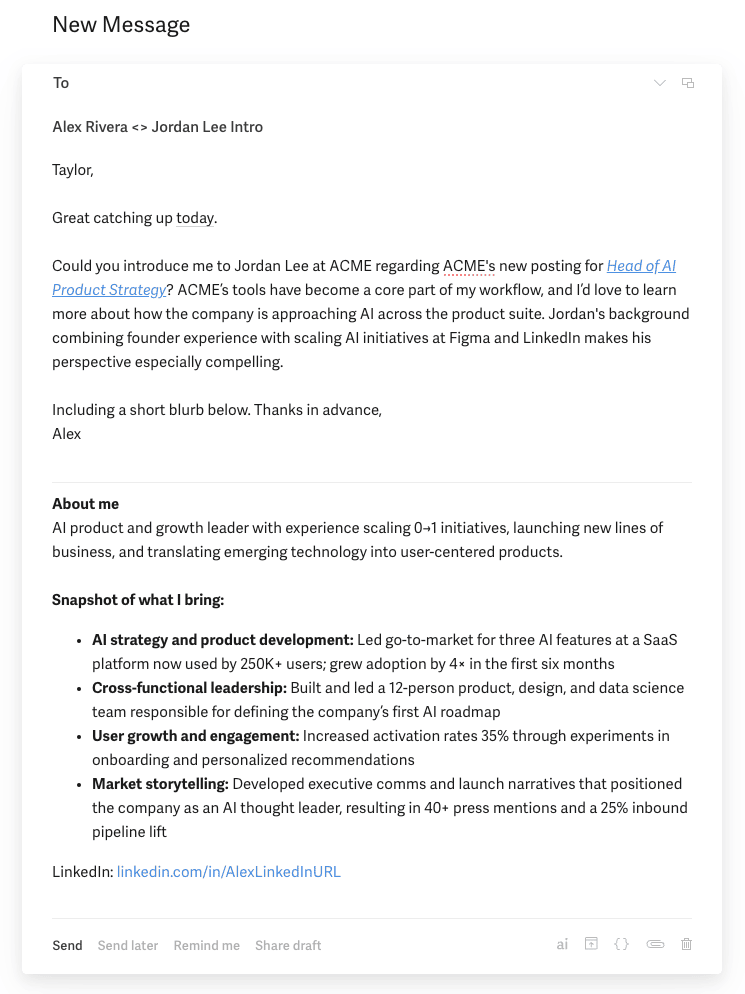
In the above example, Alex (the sender) has made a clear ask, given a strong reason for "why," added details/flattery on "why them" (i.e., specific mention of Jordan's relevant experience), and included a personalized "why me" section to prove relevance.
In this case, Taylor (the introducer) should hit forward, add a short note like "Hey Jordan, Alex is one of the best PMs I've worked with, I'd love to introduce you" and hit send.
When to send an RFI
The most common reasons you need an introduction are for job hunting and sales. But this format works for any introduction.
For job seekers
When you're applying for roles, a warm introduction can make or break your chances. Without one, your resume is just one of thousands in an applicant tracking system.
But remember: people at top companies get a lot of these requests. You need to make it easy for them to say yes. Do your homework. Show that you've paid attention.
For example:
- Reference an article or post they've written that inspired you.
- Mention a shared alma mater or professional interest.
Then, in your "about me" section, make your bullet points directly relevant to the role or team. Show you've thought about why you belong there.
For founders, sellers, or solopreneurs
If you're in sales, fundraising, or partnerships, the same logic applies. You're asking busy people to connect you with potential customers, investors, or collaborators. Most have never heard of you and may not care yet.
So do the work for them:
- Be specific about why you want to meet this person.
- Show that you understand their world.
- Make it obvious how the connection could be mutually beneficial.
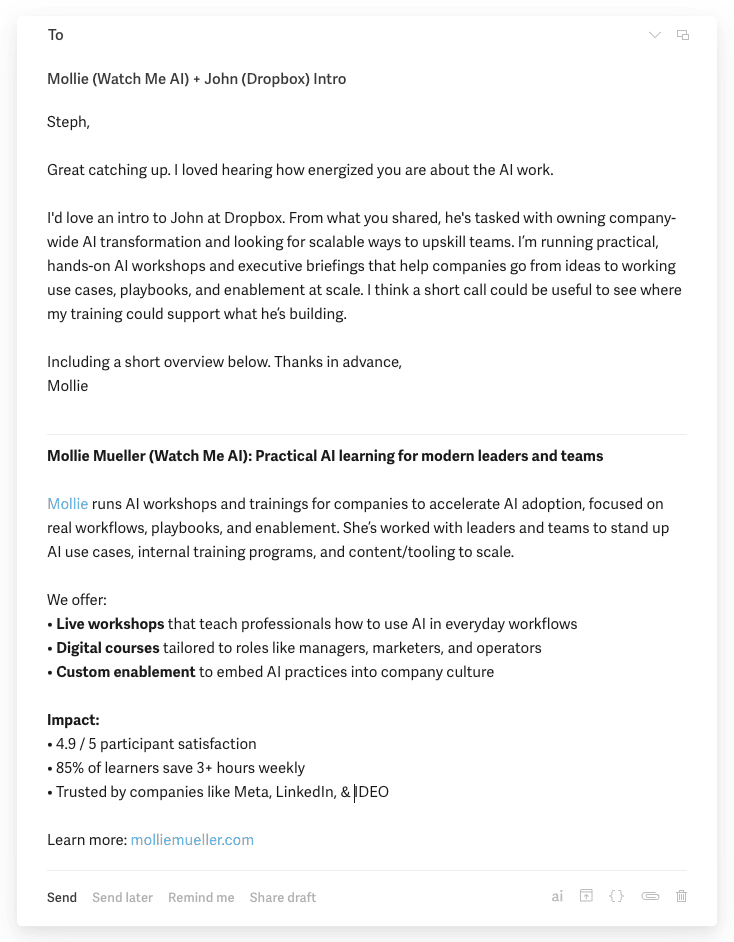
Here's an example of a sales RFI:
A note for founders and fundraisers
If you're raising money, the RFI format is essential. You'll likely ask dozens of people for introductions to investors, and this is the fastest, most respectful way to do it.
How AI can help
What I've described so far takes real effort, and it should. But AI can now handle much of the tedious part: the research and customization.
Before AI, I'd make a target list, open every LinkedIn profile, read bios and posts, find that "why them" nugget, and tweak each "about me" section manually.
Now, I let AI do 80% of that work.
Here's the simplest process:
Open up ChatGPT, Claude, or your favorite general AI tool.
Feed it:
- Your RFI template (you can use mine below)
- The name and LinkedIn URL of the person you want to connect with
- Context about your goal (job, partnership, etc.)
Ask it to:
- Research that person
- Suggest a relevant reason for why them. (You're likely clear on why that company, but you need to personalize it to the human)
- Customize your "about me" section or bullets to match your goal and their interests
If you're job-hunting, you can paste in the job description so your bullets are tailored to that role.
RFI Template (copy and adapt)
Subject: Mollie Mueller ↔ [Person you want to meet's name] Intro
Hi [Name],
Great catching up last week. Could you connect me to [Person]?
I'd love to meet them because [short, thoughtful reason].
I've included a quick blurb below. Thank you so much.
Mollie
–––
About me:
I'm [1-2 sentence summary].
Highlights:
• [Bullet 1: relevant achievement or role]
• [Bullet 2: notable project or result]
• [Bullet 3: credibility or shared connection]
Links:
[LinkedIn] | [Website]
AI Bits & Bobs
Tool to try: Napkin AI
If you've ever sketched an idea on paper and wished it could magically become a clean, professional diagram, this one's for you.
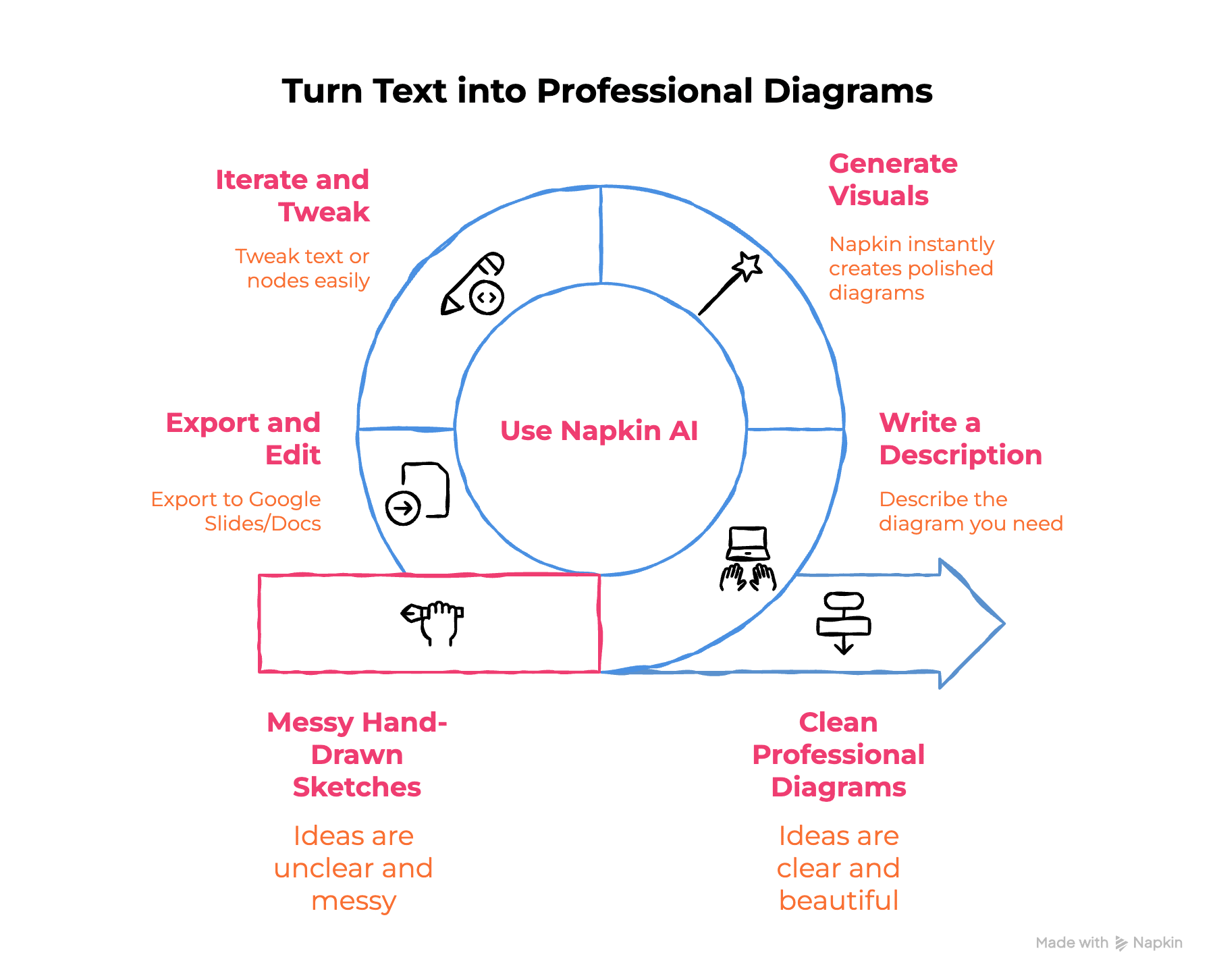
Napkin AI turns written text into editable, branded diagrams that actually look good. You can write a short description ("org chart showing product, design, and engineering under CEO"), and Napkin instantly generates polished visuals.
Why I like it:
- Transforms memos or notes into visuals that communicate complex ideas clearly
- Lets you iterate: tweak text or nodes and regenerate in seconds
- Exports easily to Google Slides or Docs for further editing
- Offers affordable plans (including a free tier and $9/month mid-range)
- Unlike Gamma or other slide tools, Napkin's diagrams don't look templated, they look designed
If your work involves explaining systems, workflows, or org structures, this is the best tool I've found for making that process fast and beautiful. Let me know if you try it and what you think.
Insight: 75% of enterprises are already seeing ROI from AI
Wharton's 2025 AI Adoption Report found that three-fourths of enterprises report a positive return on their AI investments.
There's been a lot of noise from skeptics claiming AI hasn't proven its ROI yet. Those of us working in it see the returns daily but until recently, they weren't being measured effectively. I expect 2026 will be the year of AI ROI, with more companies moving from experimentation to clear measurement and impact tracking, and this early research is promising.
Read the full Wharton report →
P.S. If you've used AI to personalize outreach or intros, reply and tell me what worked. I might feature it next week.