This week on Watch Me AI: Evaluating tools by their future, not their present + Granola workflow + free job hunting guide
Why builders should evaluate AI tools by their improvement trajectory instead of their current flaws, plus a Granola tip for querying all your meeting notes at once.
By Mollie Amkraut Mueller · · 4 min read
Deep-ish thoughts on the state of AI products
As someone who lives and breathes applied AI, here's something most people miss:
Yes, today's AI tools make mistakes. They hallucinate, they spit out sloppy drafts, they build landing pages where the boxes don't quite line up, they generate images that look slightly uncanny. They need too much prompting to get to "good enough." They are, in many cases, not as good as humans at the basics.
Most people stop there. They try an AI tool, get frustrated by the rough edges, and walk away with the conclusion: "This isn't good."
But here's the reality that's underestimated: AI improves at a pace that's almost impossible to wrap your head around. Unlike most consumer tech, where major upgrades come annually, these systems get better weekly. The Stanford AI Index reported that model performance on standard benchmarks is now doubling in less than a year. In practical terms: a tool you're disappointed in today may feel like a completely different product 6 weeks from now.
The problem is when tools overpromise their current state. I've experienced this recently with Lindy, an AI agent builder that announced you could "build an agent by just describing what you want." Twice now, I've felt suckered, not because the tool was clunky (that's normal), but because the promise set an expectation the current reality couldn't meet. I ended up in the usual back-and-forth debugging, which would have been fine if I'd expected it.
This creates a dangerous dynamic. When people's first AI experience involves feeling overhyped and disappointed, it becomes their formative impression of all AI tools. They're less likely to keep engaging, which means they miss the actual capabilities developing right under their noses.
Compare this to tools that set realistic expectations. When Lovable, Relay.app, or Granola announce features, they deliver what they promise. The tools might still be clunky, but I'm not primed for disappointment. Instead, I'm calibrated to appreciate the steady improvements.
I've seen this with my own work. When I first started using Granola seven months ago, the chat feature wasn't great. I'd ask it to write a meeting follow-up email and its output was way worse than ChatGPT, so I'd copy-paste the transcript into GPT. As of a few months ago, Granola's chat got WAY better. It now writes solid post-meeting emails and gives excellent responses to questions like "Help me prep for the follow-up meeting with this person."
The key insight: evaluate tools by their improvement trajectory, not their current flaws. Those of us building with AI learn to tolerate quirks because we know they won't be quirks for long. The average consumer evaluates the tool in front of them. Builders evaluate the curve of improvement behind it and the acceleration ahead.
AI tip of the week: ask Granola questions across ALL your meeting notes
If you've been following me, you'll know I LOVE Granola, the AI meeting note taker. Here's my new-ish favorite thing to do in Granola: ask it questions about ALL of my notes.
Example: I recently got back from holiday and had the classic "What do I do for work again?" foggy Monday morning start. I opened up Granola and asked all four of its recommended prompts (see image). Immediately felt more back in it.
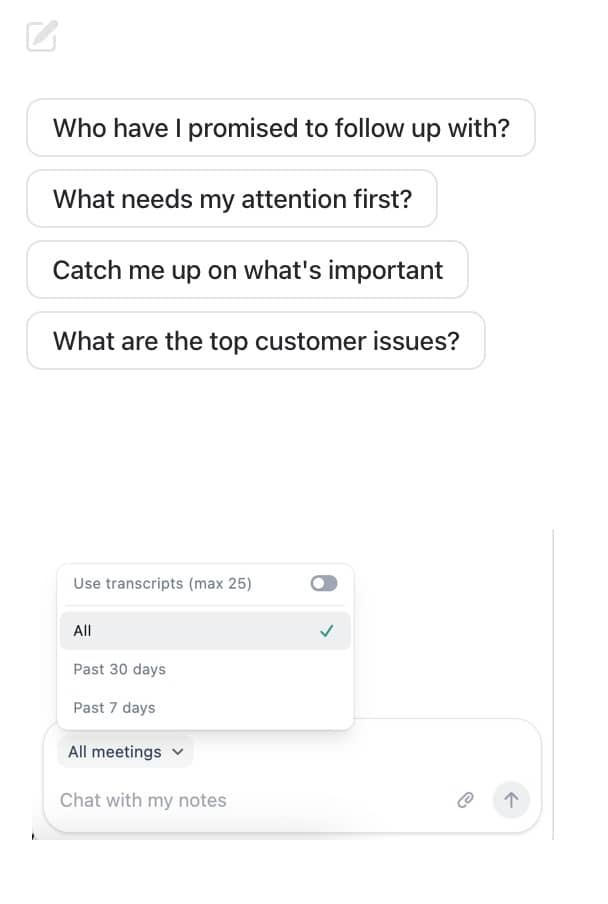
Note: You might want to change the setting at the bottom to "All" meetings to get the full picture.
New Resource: "What should I vibe code?"
I'm super excited about vibe coding (surprise surprise) and want everyone to benefit from it, but I hear a lot of people say, "I don't really know how to use this for my work".
So I built this simple tool. You put in your job title or other descriptor of your work and get ideas + prompts for things you could use vibe coding to achieve.
Excited for y'all to try it and give me feedback. Eventually I'll have to charge for this (those GPU's ain't free!) but for now it's open for testing.
Try it here: What Should I Vibe Code?
Quick pulse: Nano Banana
Have you tried Nano Banana (Google's new image generator)? Lots of hype, but I haven't found my winning use cases yet. If you have, reply with what worked! I'd love to hear.